Getting Started
nbcollection-ci is designed to be installed locally with python-pip or git. It provides a set of commands that will install and assist in managing CI/CD Pipelines. Only CirclCI is supported, however it’s still straight forward to add nbcollection-ci to Github Actions, Jenkins or another CI/CD solution.
This document covers what nbcollection-ci expects to see in a repository and associated pull request. Let’s start with an example project called nbcollection-demo. nbcollection-demo has all the moving parts of nbcollection-ci pull-request implemented. https://github.com/spacetelescope/nbcollection-demo/pull/2. It concludes with building a website by merging artifacts from CircleCI, which can than be commited into a Github Pages complient repository on Github.
How to install
$ pip install git+https://github.com/spacetelescope/nbcollection.git
How to manage a Pull Request
Pull Request 2 has all the elements you’d expect to see when running a build. The PR has nbcollection-ci installed, nbcollection-ci will be aware that it has been trigger inside a Pull Request and skip build processes and only fully build the “Pull Request” build in the CI Panel
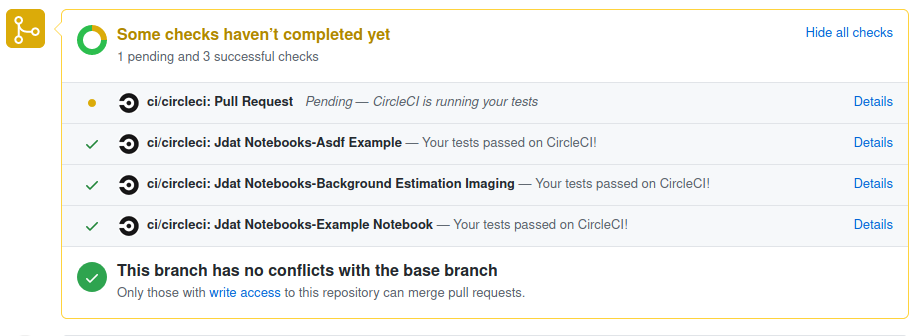
Go ahead and open the “Details” link for “Pull Request” build in another tab to inspect the CircleCI Build logs for this specific pull request.

With these Build Logs, maintainers will be able to determine most if not all reasons for a failed build. With this short introduction to tools available. I’d like to introduce some of the technology implemented in nbcollection-ci that you, the maintainer might come across while using this tool.
nbcollection-ci is built following the methodology of Fail-Fast (https://en.wikipedia.org/wiki/Fail-fast) and be as verbose in logging as possible. The way this has been implemented in the build process is by creating specific build errors relative to context the error may exist within. For example, if a requirements.txt file is missing. nbcollection-ci will raise an error indicating that the file is missing.
This translates will into how Jupyter Notebooks are built too. The errors shown within the CircleCI Build Logs will indicate the exact stack trace that caused the error, however the exact cell will still need to be correctly interpreted by the maintainer. This is a limitation of Jupyter Notebooks and the way it counts/tallies Jupyter Cells/Kernels.
nbcollection-ci introduces a few new concepts. Collections, Categories, and Notebooks. All contexts used to generate and invoke an isolated build environment.
Collections are folders found in the root level of a repository. In the example of spacetelescope/dat_pyinthesky. Collections are,
concept_APIs
hst_nb_viz
jdat_notebooks
jupyter_platform
jwst_nb_viz
planning_outlines
The attributes that elevate these folders into a collection are
The collection is a folder or directory
The collection exists at the root of the repository
The collection contains one or more categories
Categories are a little more complex. Categories are responsible for setting up and running build environments for notebooks. Looking into jdat_notebooks, some categories are
asdf_example
example_notebook
The attributes that elevate these folders into a category are
The category is a folder or directory within a collection
The category contains one or more notebooks and a requirements.txt file
Categories are somewhat special, they don’t need to be directly inside a collection. Instead, categories can be semantically present in a deeply nested folder structure. The folder names between the collection and category are turned into namespaces by nbcollection-ci. These namespaces can than be used as semantic dividers when merging artifacts and generating a website
How to manage Main Branch
Being the infrastructure engineer, your task list is endless and your coffee is bottomless. You’re grey matter is a finite resource and must be protected so that when you turn of your screen or walk away from your desk. You’ll have enough brain functionality to put the kids to bed or stand in the street yelling at your neighbors kids for taking over part of your lawn while they play kick ball in the cul de sac.
To preserve your time, nbcollection-ci implementes a series of commands to assist in managing and perserving time for all parties interested in using the framework. Since we’ve already talked about how to manage a pull request, lets cover what to do on the main branch after the pull request has been merged.
We’ve recently closed https://github.com/spacetelescope/nbcollection-demo/pull/1 and need to update the CircleCI config.yml file to run concurrent builds. nbcollection-ci expects this kind of workflow and has created a set of commands to make this process as seemless as possible. We’ll run a command to render a new config.yml file to add the a category in jdat_notebooks collection, called background_estimation_imaging notebooks.
$ git clone git@github.com:spacetelescope/nbcollection-demo.git $HOME/nbcollection-demo
$ cd $HOME/nbcollection-demo
$ git rename remote origin spacetelescope
$ nbcollection-ci generate-ci-env --ci-environment circle-ci -p $PWD
$ git commit -m 'Updated CircleCI Config with latest collections and categories found in main branch' -a
$ git push spacetelescope main
nbcollection-ci generate-ci-env has destroyed and created the .circleci/config.yml for all collections and categories found in $HOME/nbcollection-demo. With these changes pushed to Github and the new config.yml file will invoke a full run with all build jobs running in a concurrent manor.
How to generate a website from Main Branch builds
Mananging and building websites utilizes CircleCI API to extract the latest bulit artifacts from concurrent builds. Its still possible to go in and alter the way the HTML files are generated in each of the builds, eventually making it easier to generate a themed website and not simply the blank static website we can generate right now. Something left to be done in Q2.
With a completed Pull Request, we’ll take the HTML artifacts generated and available in CircleCI. Download them and merge them into a website using nbcollection-ci merge-artifacts.
$ nbcollection-ci merge-artifacts -p /tmp/merge-artifacts -r nbcollection-demo -o spacetelescope
With the artifacts created in /tmp/merge-artifacts, lets copy the files into nbcollection-demo and push them to Github Pages.
$ git checkout -b gh-pages
$ rm -rf ./*
$ cp -r /tmp/merge-artifacts/site .
$ git commit -m 'Uploading nbcollection-demo Website' -a
$ git push spacetelescope gh-pages
Give Github Pages some time to update, then navigate to https://github.io/spacetelescope/nbcollection-demo